Connect to YPulse Insights
Add the YPulse Insights connector in Claude, Cursor, VS Code, Gemini Enterprise, or any MCP client that supports remote Streamable HTTP servers with OAuth.
What this connector does
YPulse Insights gives AI clients access to YPulse's proprietary young consumer research — brand tracking, behavioral and trend survey data, and published articles and reports covering Gen Z and Millennials (ages 13–39) in North America and Western Europe.
Once connected, your AI assistant can query live YPulse data instead of guessing from general web knowledge.
Subscription requirements
You need both of the following to use this connector:
- An active YPulse subscription that includes access to the YPulse Insights MCP channel.
-
A YPulse account that can sign in through FusionAuth at
auth.ypulse.com. If OAuth succeeds but tools are blocked, your account may not have MCP channel access yet.
Brand tools (Brand Tracker, Brand Data, Brand List, and Brand
Distinct Data — brand_tracker, brand_data,
brand_list_data, and brand_distinct_data) require brand
data access on your subscription.
Behavioral tools (Behavioral & Trend Tracker, Behavioral
& Trend Question List, Behavioral & Trend Distinct Data, and Behavioral
& Trend Data — behavior_tracker,
behavior_question_list, behavior_distinct_data, and
behavior_data) require behavioral data access.
Content Search (content_search) is available to all
subscribers with MCP access.
Questions about access or entitlements? Contact your YPulse Customer Success Manager (CSM).
How to connect
-
Find the server URL. In your MCP client, add a remote HTTP
connector and enter the MCP endpoint:
Clients that support MCP discovery can also read https://mcp.ypulse.com/.well-known/mcp.json to learn the endpoint and OAuth settings automatically.
https://mcp.ypulse.com/mcp -
Start OAuth. When the client prompts you to sign in, it
opens a browser window to YPulse's FusionAuth login
(
auth.ypulse.com). Sign in with your YPulse account credentials. The client uses authorization code + PKCE; you do not paste tokens manually. - Approve access. After a successful login, the client exchanges the authorization code for a bearer token and attaches it to MCP requests automatically.
-
Confirm the connection. A healthy setup shows no repeated
auth errors,
tools/listreturns the tools your subscription includes, and a test prompt below returns YPulse-specific citations — not generic web answers.
Client configuration
Some AI platforms include a connector or integrations directory. YPulse Insights is listed in Claude's Connector Directory (see Claude.ai below). On other platforms, check the directory first — if YPulse Insights is listed, enable it from the platform UI and skip the manual configuration below.
Copy the snippet for your client. OAuth runs automatically when you connect — you do not paste tokens manually.
Claude.ai
The easiest way to connect: open Settings → Connectors → Directory, search for YPulse Insights, and click Add. No manual configuration needed — this handles OAuth automatically.
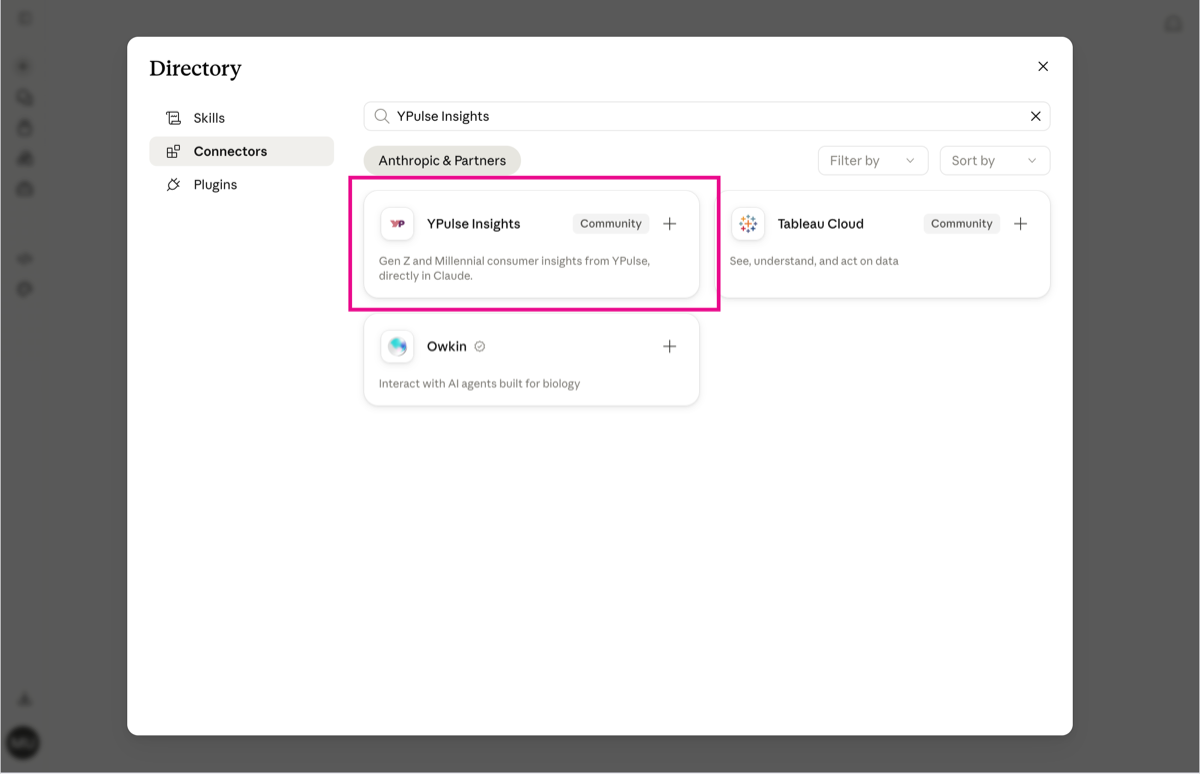
If you don't see it listed (for example, on an enterprise Claude deployment where an admin controls which Directory connectors are visible), you can add it manually instead: open Settings → Connectors → Add custom connector and enter the MCP server URL:
https://mcp.ypulse.com/mcpClaude.ai handles OAuth client identity on Anthropic's side — you only need the server URL.
Claude Desktop
Claude Desktop uses the same connector flow as Claude.ai above — open Settings → Connectors → Directory, search for YPulse Insights, and click Add. If the Directory listing is not available, use Add custom connector with the MCP server URL from the Claude.ai section.
Claude Code CLI
Add to your Claude Code MCP settings (~/.claude.json or project
config):
{
  "mcpServers": {
    "ypulse-insights-pilot": {
      "type": "url",
      "url": "https://mcp.ypulse.com/mcp",
      "oauth2": {
        "client_id": "adaf2ff1-4bce-44a4-9802-797ae1c9fd97",
        "callbackPort": 54345
      }
    }
  }
}
VS Code
One-click install (OAuth runs on first connect):

Or add to .vscode/mcp.json in your workspace:
{
  "servers": {
    "ypulse-insights-pilot": {
      "type": "http",
      "url": "https://mcp.ypulse.com/mcp"
    }
  }
}
Cursor
One-click install (OAuth runs on first connect):


Or add in Settings → MCP → Add server:
{
  "ypulse-insights-pilot": {
    "type": "http",
    "url": "https://mcp.ypulse.com/mcp"
  }
}
Gemini Enterprise
Use Generic setup below for the MCP endpoint and OAuth fields — same shared public Client ID and PKCE values as Amazon Quick, MCP Inspector, and similar connectors. No dedicated FusionAuth Application is needed for Gemini.
Gemini's Custom MCP Server connector also asks for two fields that simpler PKCE clients do not have. Both affect how well Gemini selects and uses the tools — paste the working example copy below rather than writing your own from scratch.
MCP Server Description
YPulse Insights gives access to YPulse's proprietary consumer research on Gen Z and Millennials (ages 13–39) in North America and Western Europe. It covers three data types: quantitative survey data from YPulse's Behavioral and Trend trackers (attitudes, habits, and lifestyle behaviors), Brand Tracker metrics (awareness, purchase intent, YScore, and 20 diagnostic scores across 1,200+ brands), and semantic search over YPulse's published articles, reports, and webinars. Use it to answer what young consumers think, do, or feel, how a specific brand performs with this demographic, or to surface YPulse's own published analysis on a topic.MCP Agent Instructions
Use behavior_tracker or brand_tracker as the default entry point for natural-language questions about consumer behavior or brand performance — pass the user's question as the query and let the tool handle retrieval. Use behavior_question_list or brand_list_data first when a specific survey question ID or brand name isn't already known, to discover valid identifiers before calling behavior_data or brand_data for precise, filterable figures. Use behavior_distinct_data or brand_distinct_data when filter_by needs exact labels for a high-cardinality column (household income, DMA, zip, postal code) whose values are not listed in the tool description. Use content_search to find YPulse's own articles, reports, and webinars, especially to explain the "why" behind a metric — pair it with behavior_tracker or brand_tracker when the user wants both data and context. Scope results to NA or WE when the user specifies a market; otherwise default to all regions the user's access permits. If a brand or question name is ambiguous, look it up rather than guessing. Cite the underlying source (survey type, tracker metric, or article title/date) when presenting results.Generic setup
MCP clients that ask for OAuth credentials manually — Gemini Enterprise, Amazon Quick, MCP Inspector, and other PKCE-capable clients — should use the values below. YPulse supplies these credentials; you do not need to create OAuth credentials in your own platform.
-
MCP server endpoint:
https://mcp.ypulse.com/mcp -
Client ID:
adaf2ff1-4bce-44a4-9802-797ae1c9fd97 - Client secret: none — this is a public OAuth client. Leave the secret field blank, or check Public OAuth client where the connector form offers it.
-
Authorization URL:
https://auth.ypulse.com/oauth2/authorize -
Token URL:
https://auth.ypulse.com/oauth2/token -
PKCE method:
S256 -
Scopes:
openid offline_access— required.openidenables sign-in;offline_accessis what gets your client a refresh token instead of needing repeated re-auth. Addprofile emailas well if your client displays the signed-in user's name or email address.
Callback URI. Before OAuth can complete, your client's redirect (callback) URI must be registered in YPulse's identity provider. Send the exact URI to your YPulse Customer Success Manager (CSM) so we can add it.
Not for Copilot Studio or Power Automate. Those platforms use a separate confidential-client setup and do not support this PKCE flow — contact your YPulse CSM instead of following the steps above.
Available tools
Your subscription determines which tools appear in tools/list.
Entitlements below describe what you need beyond MCP channel access.
-
Content Search (
content_search) Always available — YPulse articles and reports (RAG search over published content). -
Behavioral & Trend Tracker (
behavior_tracker) Behavioral data access — survey percentages and demographic breakdowns from YPulse behavioral and trend data, with dashboard links for further exploration. -
Behavioral & Trend Question List
(
behavior_question_list) Behavioral data access — discover survey question IDs, topics, and metadata before querying Behavioral & Trend Data (behavior_data). -
Behavioral & Trend Distinct Data
(
behavior_distinct_data) Behavioral data access — paginated DISTINCT values for filterable demographic columns (especially high-cardinality income or DMA) before filtering Behavioral & Trend Data (behavior_data). -
Behavioral & Trend Data (
behavior_data) Behavioral data access — precise weighted response distributions for specific survey questions with demographic filters and breakdowns from the behavioral survey database. -
Brand Tracker (
brand_tracker) Brand data access — brand awareness, purchase intent, YScore, and rankings from the Brand Tracker pipeline. -
Brand Data (
brand_data) Brand data access — precise structured brand metrics with demographic cuts and YScore leaderboards from the Brand Tracker database. -
Brand List (
brand_list_data) Brand data access — discover tracked brand names, regions, and industries before querying Brand Data (brand_data). -
Brand Distinct Data (
brand_distinct_data) Brand data access — paginated DISTINCT values for filterable demographic columns (especially high-cardinality income, DMA, zip, or postal code) before filtering Brand Data (brand_data).
Example prompts
Try these after connecting. Each maps to one primary tool.
Content Search (content_search)
What does YPulse research say about Gen Z's relationship with social media?
Behavioral & Trend Tracker (behavior_tracker)
What percentage of US teens own a smartphone? Use YPulse data.
Behavioral & Trend Question List (behavior_question_list)
What YPulse behavioral survey questions are available on AI in North America?
Behavioral & Trend Distinct Data (behavior_distinct_data)
What household income values does YPulse have in behavioral survey data for North America?
Behavioral & Trend Data (behavior_data)
What percentage of North American respondents pay to use an AI tool, according to YPulse behavioral survey data for question A200?
Brand Tracker (brand_tracker)
What does YPulse say about Nike's brand awareness among Gen Z?
Brand Data (brand_data)
What is Nike's brand awareness percentage in North America according to YPulse brand data?
Brand List (brand_list_data)
What footwear brands does YPulse track in Western Europe?
Brand Distinct Data (brand_distinct_data)
What distinct household income and DMA values exist in YPulse Brand Tracker data for North America?
Cross-tool (parallel)
Give me a complete YPulse picture of how Gen Z feels about Netflix — brand perception, behavioral survey data on streaming habits, and any relevant articles.
Expect the assistant to call multiple tools in parallel and synthesize brand
metrics, behavioral survey findings (from behavior_tracker or
behavior_data), and editorial content into one answer. For exact
percentages on a known survey question, it may call
behavior_question_list first, then behavior_data.
When demographic filter_by needs exact high-cardinality labels, it
may call brand_distinct_data or behavior_distinct_data
first.
Shared vs. dedicated Client ID
Most PKCE-capable clients (Claude, Cursor, Gemini Enterprise, Amazon Quick, MCP Inspector, and similar) share one public Client ID — you do not need your own FusionAuth Application per platform. A platform only gets a dedicated Client ID / Application when its trust model genuinely differs (for example confidential-client-only platforms like Copilot Studio and Power Automate, or B2B machine-to-machine integrations under B2B and automated integrations below).
Token audience (aud)
The MCP server validates every bearer JWT's aud claim
byte-for-byte against its configured audience
(https://mcp.ypulse.com
on this deployment). A mismatch returns HTTP 401
and looks identical to many other auth misconfigurations.
Tokens from the shared public Client ID carry an aud override set
by a FusionAuth JWT Populate Lambda — required for that validation to succeed.
If you are tempted to spin up a new dedicated Application for a future
platform, prefer the shared Client ID instead. A new Application needs its own
populate-lambda entry (or should simply use the shared one), or its tokens will
fail server-side audience checks with an unexplained 401.
Test your setup
To isolate OAuth config problems without involving an MCP client, run Authorization
Code + PKCE by hand. This recipe uses Postman's public redirect capture page
(https://oauth.pstmn.io/v1/callback); register that exact redirect URI
on the shared FusionAuth Application first (or use another capture page you control).
-
Generate PKCE material (S256):
VERIFIER=$(python3 -c 'import secrets; print(secrets.token_urlsafe(64))') CHALLENGE=$(python3 -c "import hashlib,base64,sys; v=sys.argv[1]; print(base64.urlsafe_b64encode(hashlib.sha256(v.encode()).digest()).rstrip(b'=').decode())" "$VERIFIER") echo "verifier=$VERIFIER" echo "challenge=$CHALLENGE" -
Open the authorize URL in a browser (replace
CLIENT_IDwith the shared public Client IDadaf2ff1-4bce-44a4-9802-797ae1c9fd97):Sign in, approve access, then copy thehttps://auth.ypulse.com/oauth2/authorize?client_id=CLIENT_ID&response_type=code&redirect_uri=https%3A%2F%2Foauth.pstmn.io%2Fv1%2Fcallback&scope=openid%20offline_access&code_challenge=CHALLENGE&code_challenge_method=S256&state=testcodequery parameter from the redirect landing page. -
Exchange the code (public client — no secret):
curl -sS -X POST 'https://auth.ypulse.com/oauth2/token' \ -H 'Content-Type: application/x-www-form-urlencoded' \ -d "grant_type=authorization_code" \ -d "client_id=CLIENT_ID" \ -d "code=AUTH_CODE" \ -d "redirect_uri=https://oauth.pstmn.io/v1/callback" \ -d "code_verifier=$VERIFIER" -
Decode the access token (payload only — no signature check)
and confirm
audmatcheshttps://mcp.ypulse.com,issmatches the FusionAuth issuer, andyp_accessis present. Then call the MCP endpoint:curl -sS -N -X POST 'https://mcp.ypulse.com/mcp' \ -H "Authorization: Bearer $ACCESS_TOKEN" \ -H 'Content-Type: application/json' \ -H 'Accept: application/json, text/event-stream' \ -d '{"jsonrpc":"2.0","id":1,"method":"tools/list"}'
If the token exchange succeeds but tools/list returns 401, the usual
cause is an aud mismatch — see
Token audience.
B2B and automated integrations
Automated integrations use FusionAuth client credentials (machine-to-machine tokens), not the interactive browser OAuth flow described above. Contact YPulse to onboard a client ID and secret — ypulse.com/contact.
Privacy
YPulse processes personal data in line with applicable privacy laws. See the YPulse Privacy Policy for how we collect, use, and protect information when you use our services.